



Earn More on Etsy: Add a New Product Line in Minutes
With TidyBox, you can prepare a whole new line of digital products in minutes: printable smart labels with your branding and a link back to your shop. Turn one design into repeatable sales with attractive margin potential, without buying stock or shipping parcels.
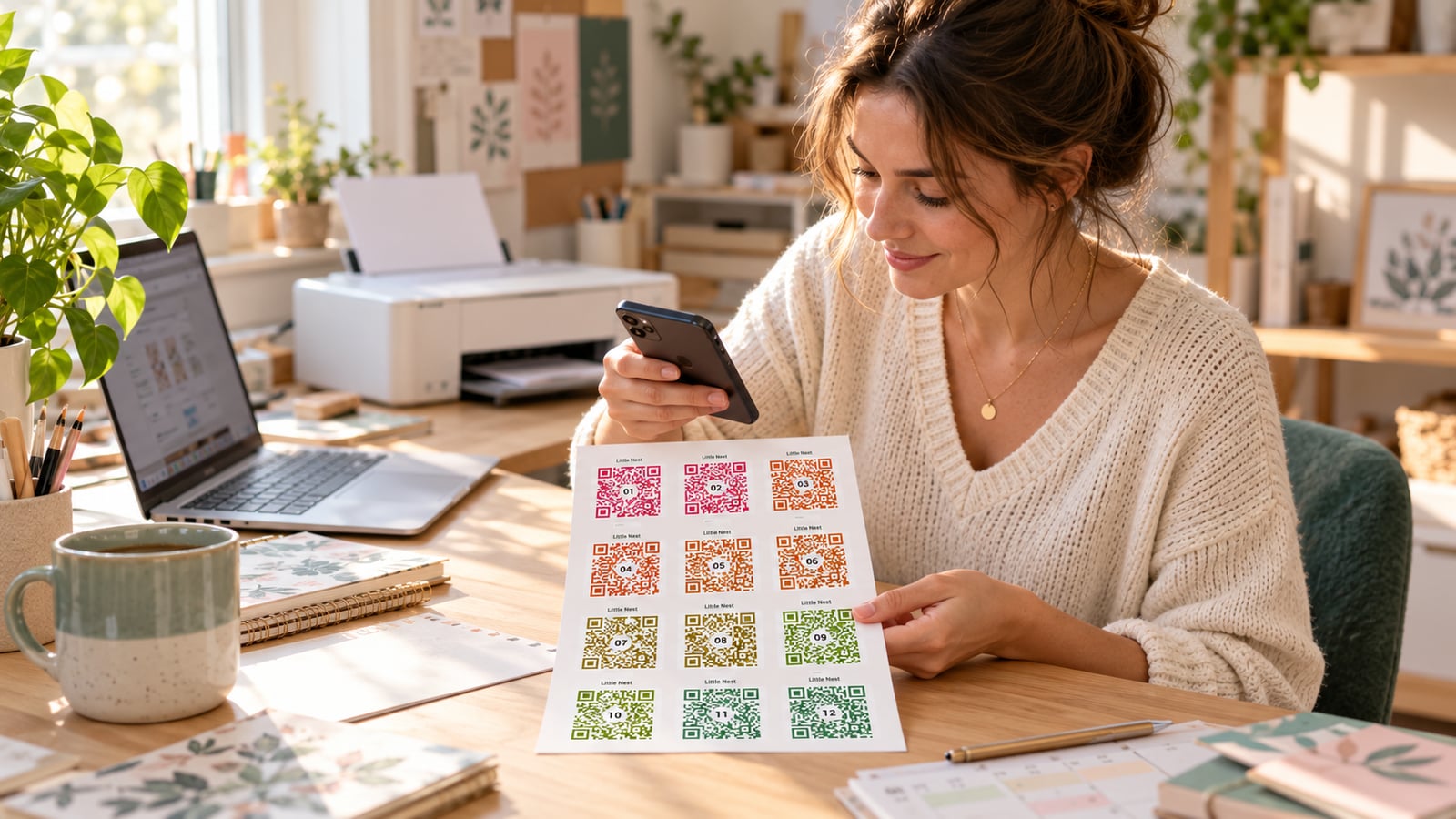
You already know how to create a printable people want to buy. You have a style, a shop and customers. Now give those customers something new: labels that do more than look good. TidyBox supplies the working QR codes and the digital contents pages; you supply the design, the product idea and the customer relationship.
No stock to purchase. No parcels to pack. No app to develop. Create your design once, offer it in several formats and generate a fresh PDF when an order comes in. Start through the website; automate when the sales justify it. Branded products use the Business subscription, with the costs explained below.
Your first 100 branded codes are included at no extra charge. Business gives you 1,000 new QR codes each month, with your printed branding included for 100 of them. That is enough to make samples, launch your first sets and test demand without buying extra codes or branding packs.
A product your customers will use long after printing
Imagine your customer looking for the Christmas lights, a particular fabric or the box with the coffee machine after a move. Instead of opening every box, they scan a sticker with their phone and see what is inside. They can add photos, search their collection and update the contents as things move around. No app installation is needed.
That gives your existing printables a useful companion:
- Sell moving planners? Add smart labels so buyers can find the kettle or bedding on the first night.
- Sell home-organization printables? Offer labels for seasonal decorations, keepsakes and storage boxes.
- Sell craft-room organizers? Help customers find fabric, yarn and supplies without emptying every drawer.
You are selling an easier way to find things, wrapped in your shop's design. The customer prints at home and keeps using the product. When their storage grows, another label set becomes a natural next purchase.
One design, a whole shelf of digital products
A new product line does not have to mean designing every item from scratch. Use the same visual identity for a starter pack, a larger household set, moving labels and a thermal-printer edition. Each can have its own Etsy listing, price and preview.
Let buyers choose the pack that fits their project. Offer, for example, 24 or 48 unique labels, or a set defined by its number of pages. The order determines what you generate:
- A4 starter pack: SC fits 12 labels per page. Two pages with one copy per code give 24 labels for 24 boxes; four pages give 48.
- Moving pack: MV fits 15 stickers per page. Three copies of each code label three sides of five boxes. More printed stickers do not mean more unique codes.
- Small and large storage: MID, MINI and XL provide 21, 40 and eight positions per A4 page. MIX combines 72 unique labels across four sheets.
- Thermal edition: generate a separate PDF for a supported roll size, such as 100 × 50 mm. Set the number of codes and copies to match the order.
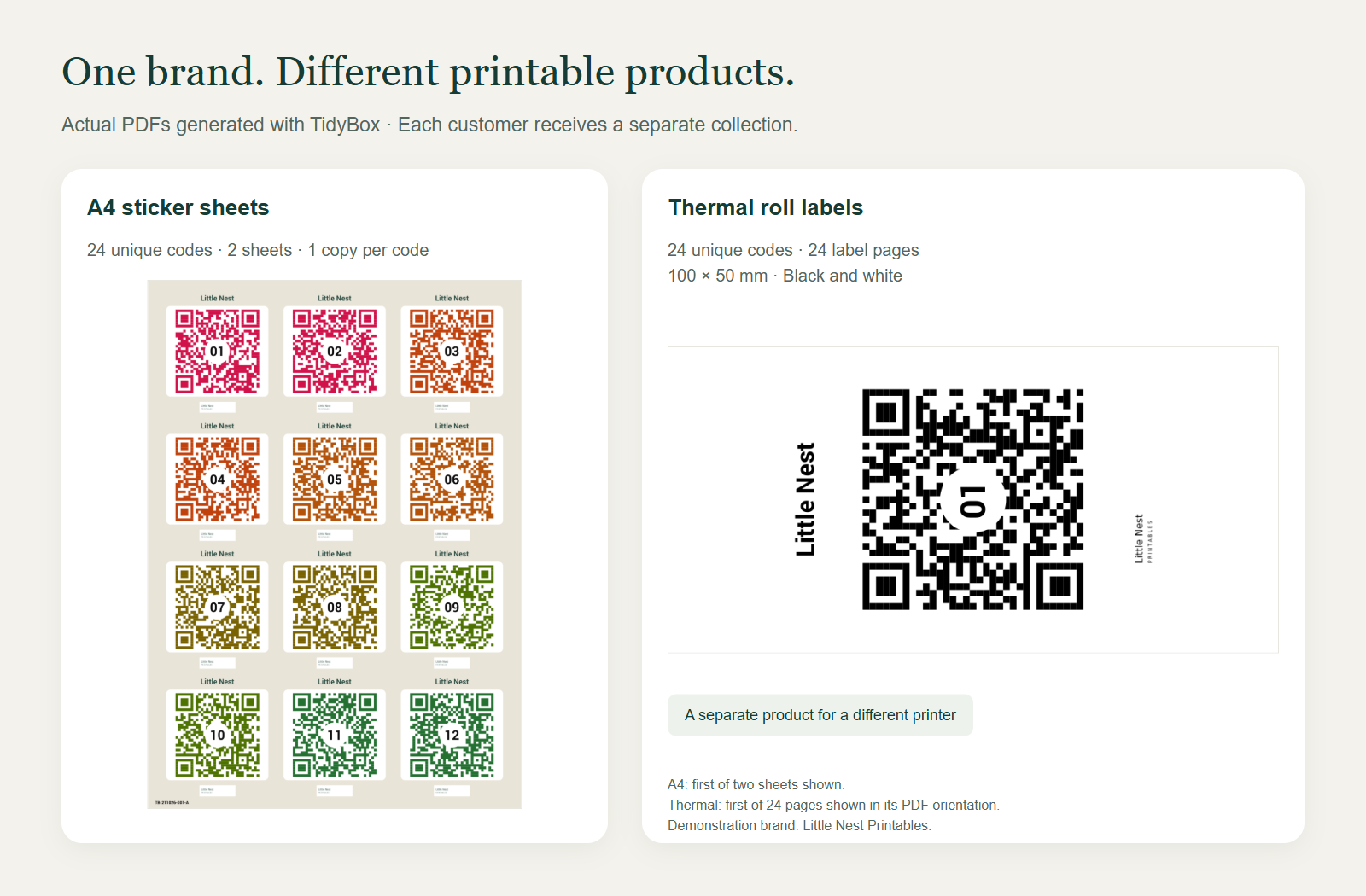
A4 PDFs suit ordinary inkjet or laser printers with matching paper. Thermal PDFs are black and white; the smallest minimal presets omit the header and logo. State the exact dimensions in each listing and test the intended paper. A4 is not US Letter, and a printable PDF is not a cutting-machine file.
Etsy does not offer variations on digital listings. Give buyers the choice through separately priced listings for each format or pack size, or agree a custom order before payment. A personalization field does not automatically change the price. See Etsy's digital-listing instructions.
Open the generator and explore the formats before deciding which products belong in your shop.
Try the label generator Create your account
Your brand stays with the buyer, and leads back to your shop
Put your header, colours and logo on the sticker. Add your shop name, welcome message and accent colour to the page that opens after scanning. Then set up a Buy more labels button pointing to your Etsy shop or a specific listing.
The next purchase can start on the label your customer already uses. When they need labels for more boxes, your shop is one tap away. You do not have to hope they remember which seller they bought from months ago.
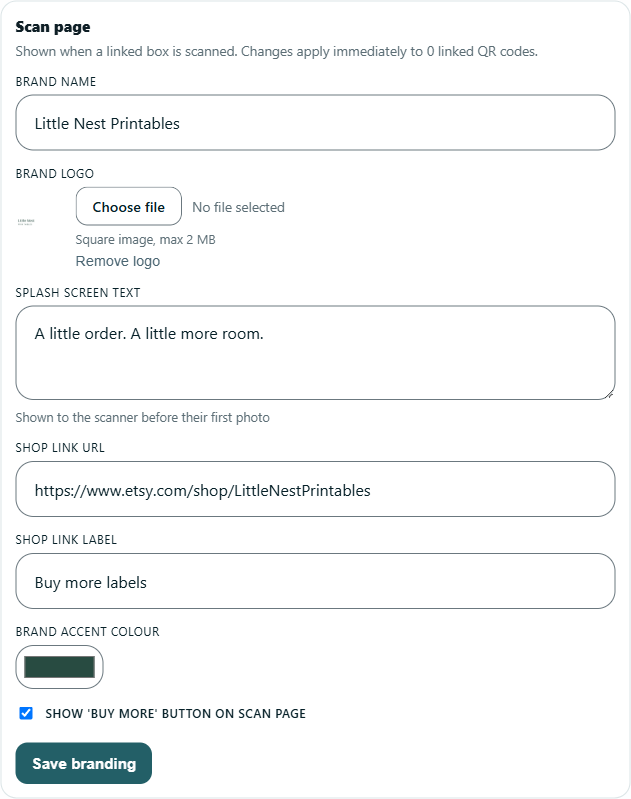
Save these settings once and reuse them for new orders. Updating the brand updates its linked scan pages; previously issued sticker artwork stays the same when re-exported. An eligible Business subscription keeps branded scan pages active.
The screenshots use Little Nest Printables, a fictional demonstration shop, on real TidyBox screens.
Let your first sales pay for the subscription
You do not buy physical labels for every order or pay to post them. Your design can earn from one order after another, and the included allowance lets you start selling before buying any additional packs.
Business costs €50 per month and includes 1,000 new QR codes, with 100 branded codes at no extra charge. Those 100 use your printed design; they are part of the 1,000-code allowance. You can also sell sets in the standard sticker design using the ordinary codes.
Four sales can cover the subscription. For example, four sets of 24 branded codes at €20 per set bring in €80. They use 96 of the 100 included brandings and 96 of the 1,000 codes, so no extra packs are needed. After the €50 subscription, €30 remains to cover marketplace and payment fees, taxes and your time. Your price and costs determine the result; this is a calculation example, not a sales forecast. The remaining ordinary codes give you room to sell more sets in the standard design.
When demand grows, another 100 sticker-branding credits cost €20. Each new branded code uses one ordinary code and one branding credit. Monthly allowances do not roll over; purchased balances do not expire and are used after the corresponding monthly allowance. Multiple printed copies of the same code and downloading an existing collection again use no additional codes or branding credits.
From a paid order to a branded PDF
You can start without a developer. Create an account, subscribe to Business, save your brand and make a sample set. For customer-specific codes, use a made-to-order digital listing built around your original design and instructions.
- Receive the order. Note its format, unique-code count and printed copies or pages.
- Generate the matching set. Select your brand, the branded scan page and the printed sticker design. For the 24-code starter pack: A4, SC, two sheets, one copy per code.
- Download and deliver. Name the collection after the order, check the PDF and attach it to the Etsy order with simple printing and first-scan instructions. Etsy supports up to five files per completion, each up to 20 MB.
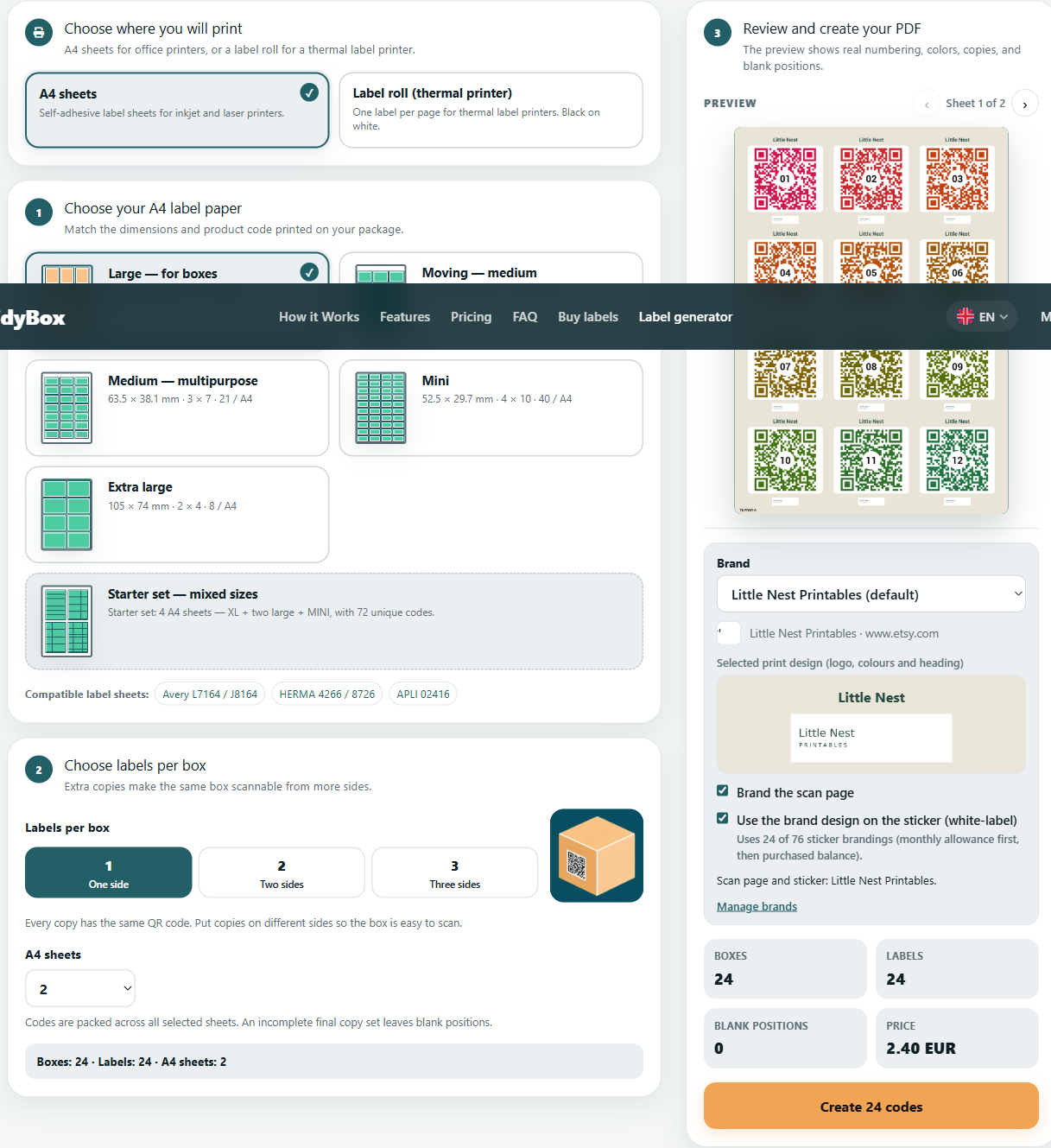
Generate new codes for each buyer. Reusing a working QR PDF across customers would send them to the same boxes. Keep the collection ID with the order so a replacement download uses the existing set. Deliver the file itself, rather than only a temporary download link.
Prefer working in AI chat?
Business includes TidyBox's MCP server. Connect a compatible assistant such as Claude or Codex using a token from your profile, and set up your brand in TidyBox once. Then request the order file in ordinary language:
Prepare a PDF for Order 1042 with Little Nest Printables branding. I need 24 unique codes on two A4 SC pages, one copy per code. Apply the sticker design and branded scan page. Check the allowance, generate a separate collection for this buyer and give me the download link.
The assistant can check the configuration, create the collection and wait for the file. Keep the token in the connector settings, not in customer files or prompts.
Ready to handle more orders?
Use the API to connect paid orders to generation: map the purchased format and quantity, create the collection, wait for the PDF and pass it to your delivery workflow. Store the order-to-collection mapping so a retry does not create duplicate codes. The API and MCP reference explains the connection. Etsy order intake and delivery require a separate integration; start manually and automate the steps that actually take your time.
Make your first sample, then build your first offer
Choose a use case your existing buyers already care about. Create one design and two clearly priced pack sizes. Print a sample at actual size/100%, scan it and experience what you will be selling. Your first listing can show both the attractive printable and the useful page behind it.
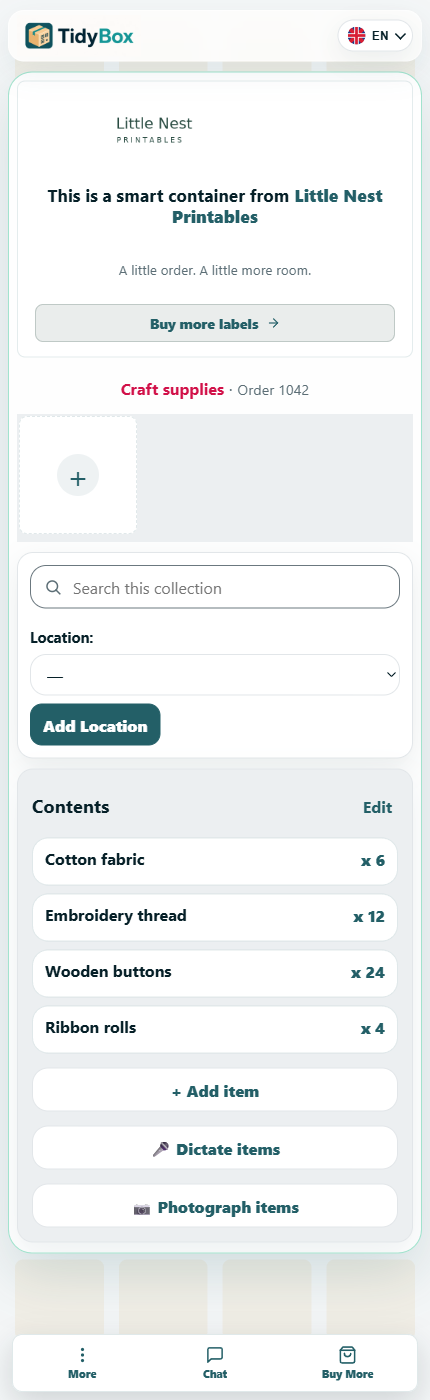
Include a short buyer guide: print, attach, scan, add contents and link the collection to their account. Explain that this is a digital file, no physical stickers are shipped, and internet access is needed. The access guide explains how buyers can link their collection and choose its access settings.
You already have the shop and the creative skills. Try the generator, put your brand on a sample and turn it into your next product line.