




Self Storage Smart Inventory: How Operators Add a Box-Level Inventory Service with TidyBox

Self storage smart inventory is a simple idea: every box that goes into a unit gets a QR label, the tenant photographs the contents once while packing, and from then on one search shows which box holds the winter tyres, the tax folder or the camping stove. For a storage operator this is a service that can be added to the booking flow, sold as a paid extra or included as a differentiator, and delivered with nothing more than a printer. This guide describes how self storage operators offer Smart Inventory with TidyBox, what the tenant experience looks like, how the labels get to the customer, and why the operator's brand stays on every scan for the life of the label.
The problem tenants bring to your facility
Most people arrive at a storage unit with fifteen to forty boxes and a marker-pen inventory that says "kitchen", "books" or "misc". Three months later they drive to the facility, open the unit and start opening boxes. The visit takes an hour instead of five minutes, the unit gets messier every time, and the tenant quietly starts wondering whether storage is worth the money.
Operators cannot solve this with a bigger unit or a better lock. It is an information problem: nobody wrote down what went into which box. TidyBox solves it at the label level. A TidyBox smart label is a QR code that opens a box page in the phone's browser. There is no app to install and no account needed to scan. The tenant takes one photo of the open box, AI recognizes the items and builds a list, and the list can be corrected by hand or dictated by voice. Every box in the unit belongs to one collection, so one search covers the whole unit. Details of the underlying system are in What is TidyBox? and the collections guide.
What the Smart Inventory add-on looks like in the booking flow
The add-on fits the same place as insurance, a padlock or a box bundle: the tenant sees it while reserving a unit, ticks it, and states how many boxes they are moving in with. The operator's side then does one thing: it obtains a TidyBox label collection for that tenant, sized to the number of boxes, and delivers it in one of two ways.
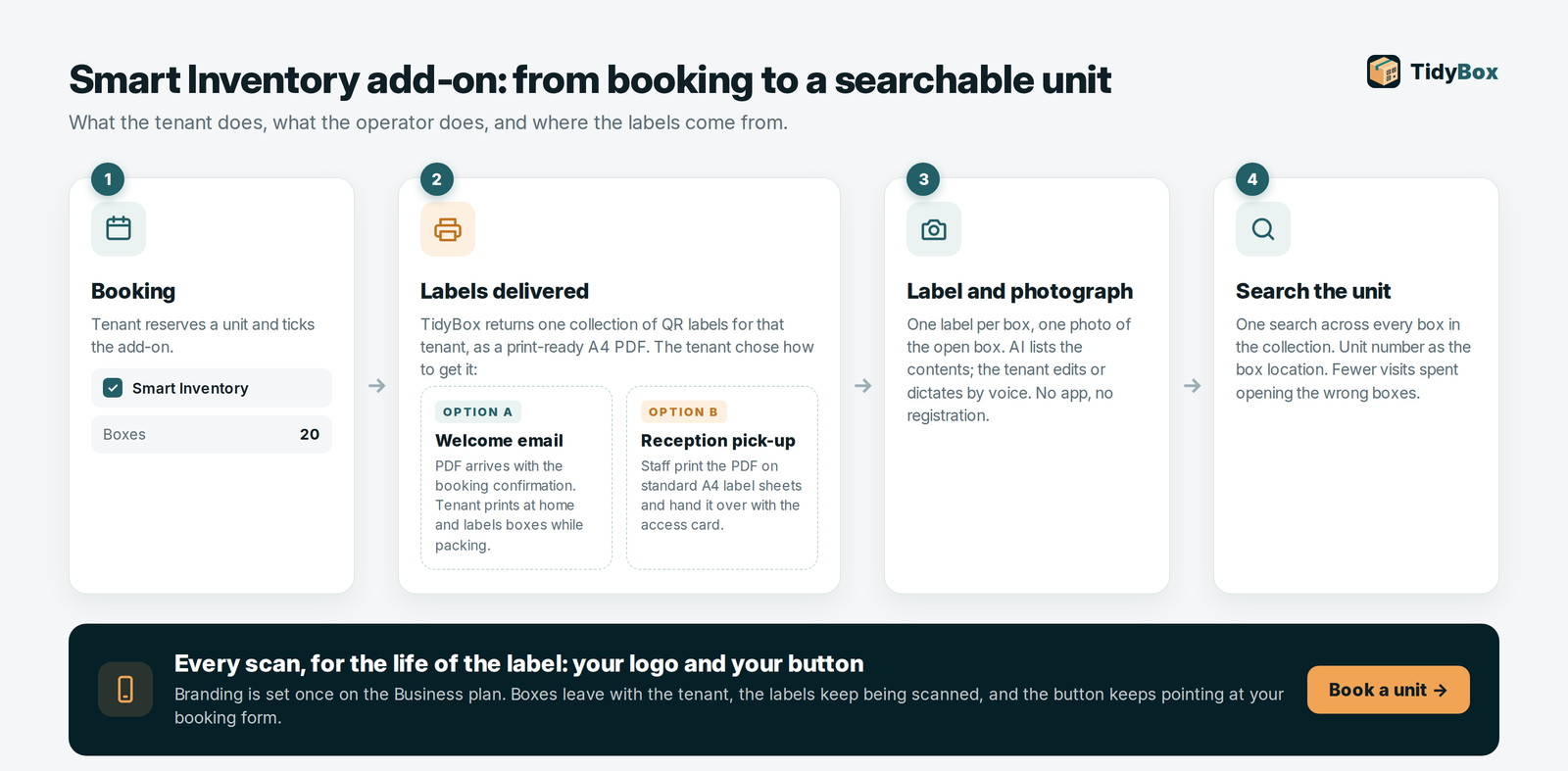
Option A: labels in the welcome email. The tenant chooses to receive the collection immediately. The print-ready PDF is attached to, or linked from, the welcome email. The tenant prints it at home on plain paper or on standard A4 label sheets, sticks a label on each box, and photographs the contents while packing. By the time the van arrives at your gate, the inventory already exists and the boxes are already searchable. This is the option that costs the operator nothing to fulfil.
Option B: pick-up at reception. The tenant prefers to collect the labels on move-in day. Reception prints the collection on standard self-adhesive A4 sheets and hands it over with the access card. The tenant labels boxes in the unit or in the loading bay and photographs each box as it goes onto the shelf.
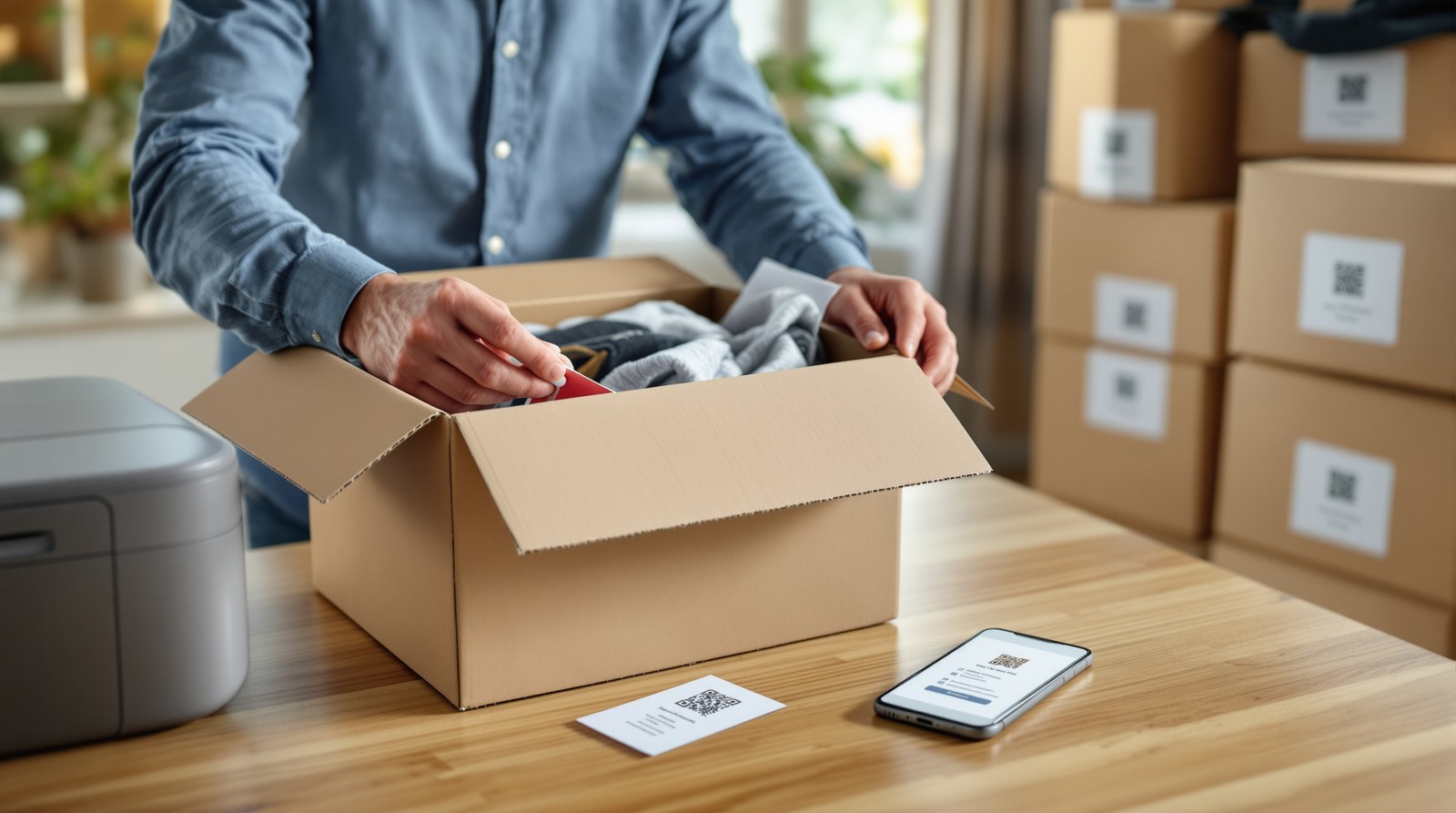
Both options produce the same result: one collection per tenant, one label per box (or two or three copies per box so a stacked box can be scanned from the side), and a unit number that can be used as the box location inside TidyBox. Tenants who want to keep the inventory beyond scanning can claim the collection to a free TidyBox account; the access guide explains claiming and the public, view-only and private modes.
Sell it, or give it away as a competitive advantage
There are two workable business models, and some operators run both across different sites.
Sell the add-on. Smart Inventory has a clear scope that tenants understand: labels for N boxes, photo inventories, one search across the unit, access from any phone. Price it per booking, per box range or as part of a "move-in pack" together with boxes and tape. Because labels are generated from your TidyBox Business quota and the fulfilment is a PDF, the margin is almost entirely yours. The Business plan costs €50 per month and includes 1,000 smart labels; top-up packs extend the quota when a site needs more.
Include it for free. In markets where several facilities compete on the same street, "every unit comes with Smart Inventory" is a concrete promise that a price list cannot copy in one line. The tenant gets a searchable unit, fewer wasted visits and a reason to mention your facility to friends. You get a marketing message that is about the tenant's problem rather than about square metres.
Whichever model you choose, describe the service precisely: what the tenant receives, how many labels, how to print, how to scan, and who can see the inventory. Avoid absolute promises; the value is a documented, searchable unit, not a guarantee.
Your brand on every scan, for years, even after move-out
This is the part of the service that keeps working after the tenancy ends. Collections created on a Business plan carry the operator's branding on every scan page: your logo, brand name, a short welcome message, an accent colour, and a customizable button. The button's label and destination are yours to set. Point it at your website, at the unit booking form, or at a "Reserve a unit" landing page, and call it "Book a unit", "Buy more" or whatever fits.
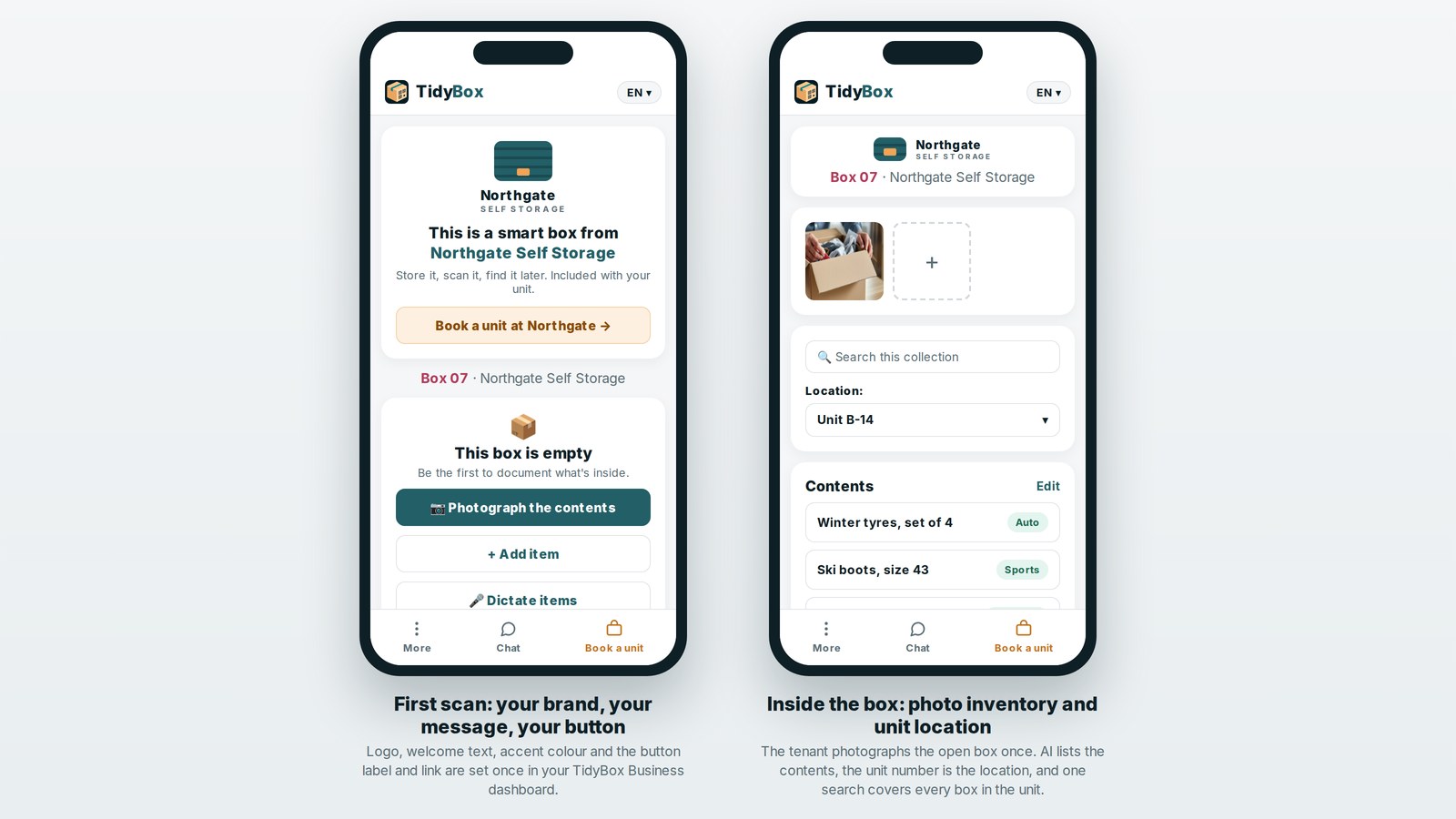
Tenants keep their labelled boxes. The boxes go into a garage, a loft or a new flat, and the labels keep getting scanned whenever somebody looks for an item. Those scans show your logo and booking button, so former tenants can return to your reservation form. Business lets you manage up to 10 brands with individual settings in your profile and choose one for each new collection or batch. Changes to a brand automatically update its linked scan pages. See TidyBox for Business for details.
What reception needs to print the labels
Printing at reception is deliberately low-tech. TidyBox generates an A4 PDF laid out for standard self-adhesive label sheets, so the only equipment is the office printer and a pack of label paper from any stationery supplier.

The generator at tidybox.eu/generate shows the choices your staff will see. Pick a paper format: large labels (63.5 × 72 mm, 12 per sheet) suit standard storage boxes; the moving format (70 × 50.8 mm, 15 per sheet) suits removal cartons; medium, mini and extra-large formats cover binders, small containers and pallets. Each format lists the compatible off-the-shelf sheets, for example Avery L7164 / J8164, HERMA 4266 / 8726 and APLI 02416 for the large format. Then choose one, two or three labels per box; extra copies carry the same QR code and go on different sides so a stacked box can be scanned without moving it. The preview shows real numbering, colours and any blank positions before the PDF is created, and "Add my business branding" applies your logo and button to the whole collection.
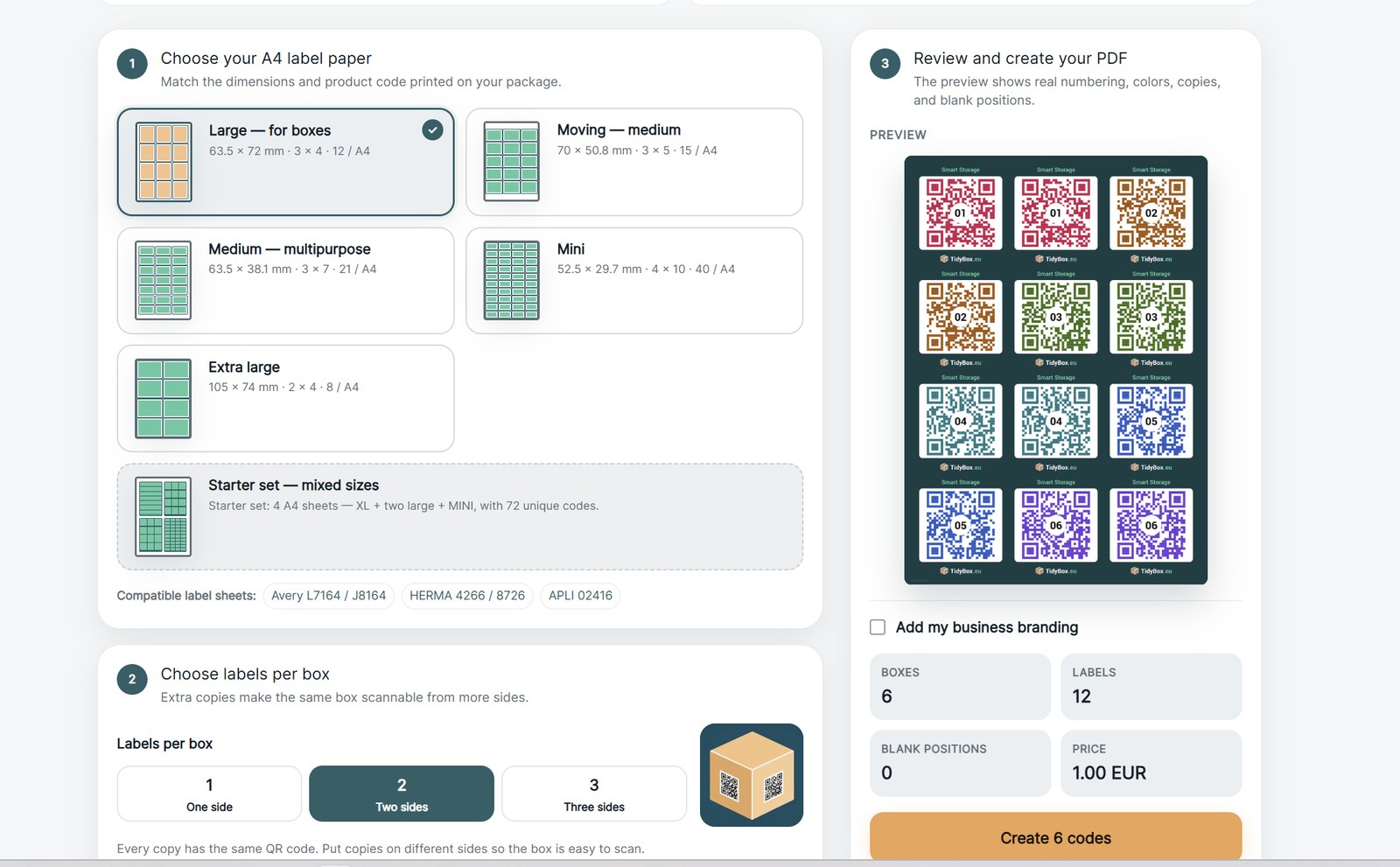
A tenant with 20 boxes and two labels per box needs 40 label positions, which is four large-format sheets. Reception can print them in the time it takes to prepare the access card. For tenants who choose the welcome email, the same PDF is what they print at home.
Three ways to connect Smart Inventory to your booking system
Integration is small on purpose, because the operator's side only needs to do one thing: request a collection of N labels for a tenant and receive a PDF back.
- Through your self storage software. TidyBox is being integrated with platforms and marketplaces that specialise in self storage management. Where such a connection is available for your platform, a completed booking with the Smart Inventory option can trigger label generation automatically, with the unit number pre-filled as the box location and the PDF attached to the tenancy record.
- Directly, through the TidyBox API or MCP. Operators with their own booking site or an in-house system can call a token-secured HTTPS API: request a print-ready collection for a paper layout, poll until it is ready, download the A4 PDF. The same token powers an MCP server, so an AI assistant such as Claude can generate whole batches of collections from a chat message when a site wants to pre-print move-in packs.
- Manually, on the Business plan. No integration at all: when a booking with Smart Inventory comes in, a staff member opens the generator, enters the number of boxes, selects branding and downloads the PDF. For a single site with a few move-ins a day this takes about a minute per tenant.
For anything beyond the manual route, contact us or write to support@tidybox.eu with the name of your booking platform and the number of sites. We will tell you what is already available for your setup and what a direct connection would involve.
A practical rollout for one site
Start with a single facility and a defined pilot before adding the option to every booking page.
- Decide the model. Paid add-on, included perk, or paid at one site and included at another.
- Create or select a brand in your profile. Set its logo, name, welcome message, accent colour and booking button. Business supports up to 10 brands, each with individual settings.
- Choose the label format and copies. Match the boxes you sell at reception, and decide whether tenants get one, two or three labels per box.
- Add the option to the booking flow. A checkbox, a box-count field, and a choice between welcome email and reception pick-up.
- Brief reception. Where the label paper is kept, how to print a collection, and how to show a tenant the first scan on their own phone. The first scan is the moment the service becomes real.
- Measure. Attach rate of the add-on, tenants who claimed their collection, scans per tenant over the first month, and the number of clicks on your booking button from former tenants' scans.
Tenants who label boxes on move-in need less help finding things later, so the pilot also tends to show up as fewer "I cannot find my box" calls at reception.
Request a free pilot
TidyBox offers self storage operators a free pilot: trial sticker sets, training materials for reception staff, and one month of Business access at no cost. Fill in the pilot request form, choose "Self-storage service" as the business type, and describe how many sets and copies per sticker you want to test. To see the tenant experience first, create a free account and generate a small collection at tidybox.eu/generate, or order a ready-made sticker set from the TidyBox shop and label a few boxes in your own storeroom.